$10.43
Add to Cart
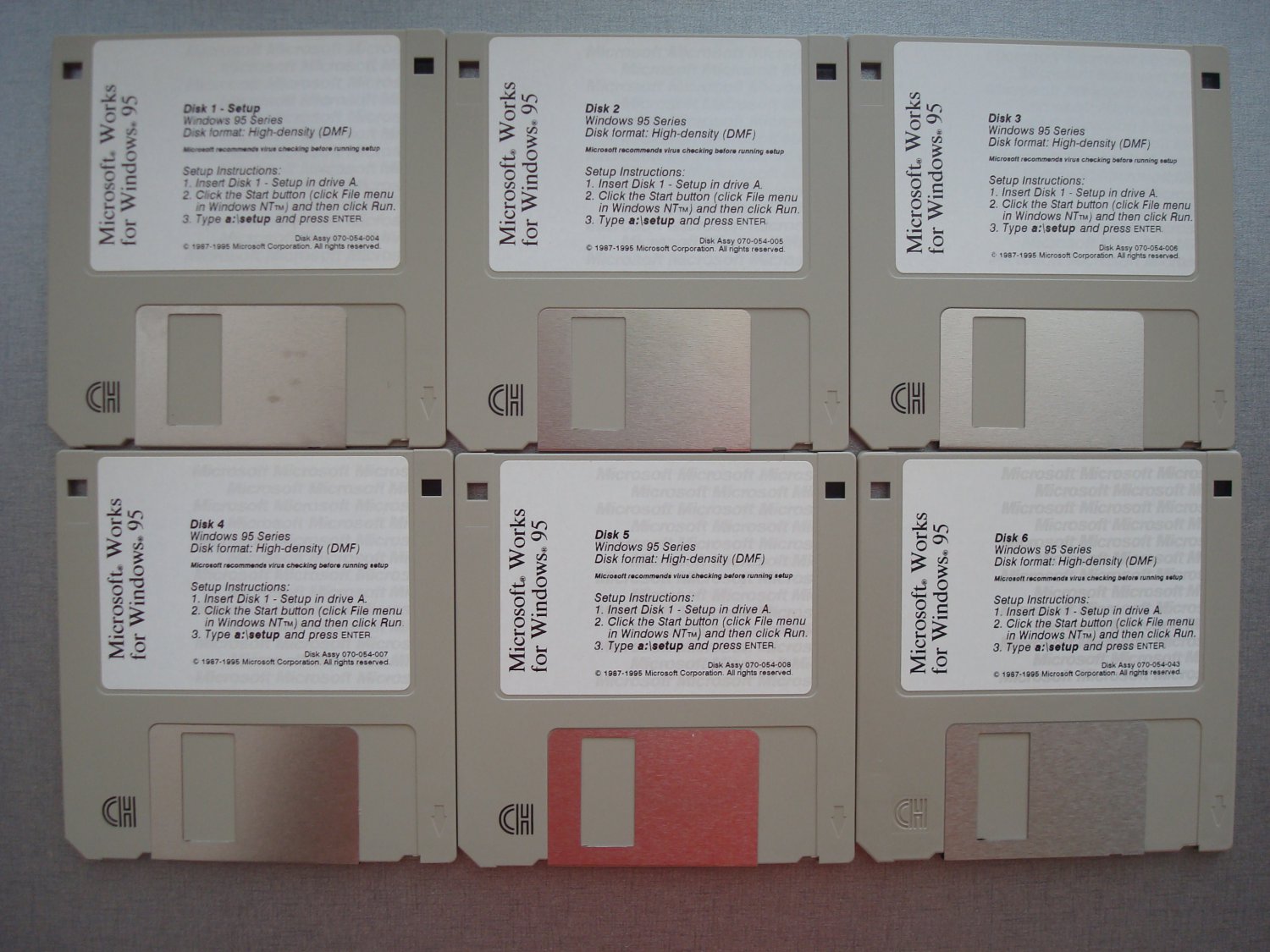
Microsoft Works For Windows 95, 3.5" Disks


Appearance: Used
Functionality: Working
Description:
============
As pictured, Microsoft Works For Windows 95. Disks have been spot-checked, can provide electronic disk images if needed.
Warranty and Returns:
=====================
We understand that there may be compatibility issues, space constraints, or it just doesn’t look perfect. This item can be returned within 14-days for ANY reason. However, shipping to and from is not refundable.
Shipping:
=========
- Other shipping methods are available – contact us for details.
- Combined shipping is available for most items – contact us for details.
- Local pickup is also available at no cost.
About Us:
=========
The Computer Preservation Group is dedicated to the preservation of historical computers. To help fund ongoing operations, select items are made available. To learn more, please visit our website: www.computerpreservation.com. Thank you for your support!
Stock#:J3556.CC#.5
Details from https://en.wikipedia.org/wiki/Microsoft_Works :
Microsoft Works was a productivity software suite developed by Microsoft, sold from 1987 to 2009. Its core functionality included a word processor, a spreadsheet and a database management system. Later versions had a calendar application and a dictionary while older releases included a terminal emulator. Works was available as a standalone program, and as part of a namesake home productivity suite. Because of its low cost ($40 retail, or as low as $2 OEM),[1] companies frequently pre-installed Works on their low-cost machines. Works was smaller, less expensive, and had fewer features than Microsoft Office and other major office suites available at the time.
History
Microsoft Works originated as MouseWorks, an integrated spreadsheet, word processor and database program, designed for the Macintosh by ex-Apple employee Don Williams and Rupert Lissner.[2] Williams was planning to emulate the success of AppleWorks, a similar product for Apple II computers. Bill Gates and his Head of Acquisitions, Alan M. Boyd, convinced Williams to license the product to Microsoft instead.[3] Initially it was to be a scaled-down version of Office for the (then) small laptops such as the Radio Shack TRS-80 Model 100 which Microsoft was developing. As laptops grew in power, Microsoft Works, as it was to be called, evolved as a popular product in its own right.
On September 14, 1987, Microsoft unveiled Works for DOS.[4] The initial version 1.x of Works ran on any PC with at least 256k of memory. Works 2.x, introduced in 1990, required 512k and 3.x, introduced in 1992, required 640k.
In 1991, Microsoft issued the first Windows version of Works, titled MS Works for Windows 2.0 (there was no version 1.x). System requirements consisted of Windows 3.0, a 286 CPU, and 1MB of memory. Works 3.x in 1993 moved to requiring Windows 3.1, a 386 CPU, and 4MB of memory. Subsequent releases were for Windows 95 and up and the final version was Works 9.x in 2007, requiring Windows XP or Vista, 256MB of memory, and a Pentium 4 CPU.
Microsoft released Macintosh versions of Works starting with Works 2.0 in 1988. The version numbering roughly followed that of Windows releases.
Through version 4.5a, Works used a monolithic program architecture whereby its word processor, spreadsheet and database documents ran in windows of the same program interface. This resulted in a small memory and disk footprint, which enabled it to run on slower computers with requirements as low as 6 MB of RAM and 12 MB free disk space. It also provided a mini version of Excel for DOS systems as a DOS version of that program was not available.[5] Works 2000 (Version 5.0) switched to a modular architecture which opens each document as a separate instance and uses the print engine from Internet Explorer.
Version 9.0, the final version, was available in two editions: an advertisement-free version, available in retail and for OEMs, and an ad-supported free version (Works SE) which was available only to OEMs for preinstallation on new computers.[6]
In late 2009, Microsoft announced it was discontinuing Works and replacing it with Office 2010 Starter Edition.[7][8]
Features
This section needs additional citations for verification. Please help improve this article by adding citations to reliable sources. Unsourced material may be challenged and removed.
Find sources: "Microsoft Works" – news · newspapers · books · scholar · JSTOR (April 2017) (Learn how and when to remove this template message)
Microsoft Works has built-in compatibility for the Microsoft Office document formats (DOC and XLS), including, but not limited to, the ability of the Works Word Processor to open Microsoft Word documents and the ability of the Works Spreadsheet to open Microsoft Excel workbooks. Newer[which?] versions include task panes but do not include significantly updated features. Even in the final version (Version 9.0), the Windows 95-era icons and toolbars were not updated to make them consistent with later application software.
While its utility for larger organizations is limited by its use of incompatible proprietary native .WKS (spreadsheet), .WDB (database), and .WPS (word processor) file formats, the simplicity of integrating database/spreadsheet data into word processor documents (e.g., mail merge) allow it to remain an option for some small and home-based business owners. Version 4.5a is particularly noted in this respect.[citation needed] The database management system, while a "flat file" (i.e., non-relational) allows the novice user to perform complex transformations through formulas (which use standard algebraic syntax and can be self-referential) and user-defined reports which can be copied as text to the clipboard. A 'Works Portfolio' utility offers Microsoft Binder-like functionality.
By installing the 2007 Office System Compatibility Pack, the Works Word Processor and Spreadsheet can import and export Office Open XML document formats, although they are converted rather than being operated upon natively. The Works Calendar can store appointments, integrates with the Windows Address Book, as well as Address Book's successor, Windows Contacts, and can remind users of birthdays and anniversaries. It supports importing and exporting iCalendar (.ICS) files. It does not support subscribing to iCalendar files or publishing them online via WebDAV. Up to version 8, using the Works Task Launcher, the calendar and contacts from Windows Address Book could be synchronized with portable devices. In Works 9.0, the sync capability has been removed.[9]
File format compatibility
Microsoft makes file format conversion filters for Microsoft Word for opening and saving to Works Word Processor format.[10][11] Microsoft Office Excel can import newer Works Spreadsheets because the newer Works Spreadsheet also uses the Excel format but with a different extension (*.xlr).[12] There is an import filter for older Works 2.0 spreadsheet format (*.wks);[13] however it may be disabled in the registry by newer Microsoft Office Service packs.[14] As far as Works Spreadsheet 3.x/4.x/2000 (*.wks) and Works database (any version of *.wdb) files are concerned, Microsoft does not provide an import filter for Excel or Access. There are third party converters available for converting these filetypes to Excel spreadsheets: For database files (*.wdb) there is also a donateware utility;[15] for spreadsheet (*.wks) and database (*.wdb) files a commercial solution is available.[16]
A general C++ library, libwps,[17][18] can extract text from many different versions of Microsoft Works. LibreOffice, NeoOffice and OxygenOffice[19] have included libwps. libwps also provides a command line converter.
One commercially available solution for converting to and from Microsoft Works files on the Macintosh platform is the MacLinkPlus product from DataViz. Free online conversion services are also available.[20]
Version history
Microsoft Works 2.0 for DOS
Works for MS-DOS
Microsoft Works 1.5
Microsoft Works 1.12
Microsoft Works 2.0 and 2.00a
Microsoft Works 3.0, 3.0a and 3.0b
Works for Mac OS
Microsoft Works 1.0
Microsoft Works 2.0
Microsoft Works 3.0
Microsoft Works 4.0
Works for Microsoft Windows
Microsoft Works 2.0 and 2.0a (Windows 3.x)
Microsoft Works 3.0, 3.0a and 3.0b (Windows 3.x)
Microsoft Works 4.0, 4.0a, 4.5 and 4.5a (Windows 95)
Microsoft Works 2000 (v.5)
Microsoft Works 6.0 – Last version for Windows 95
Microsoft Works 7.0 – Last version for Windows 98 (Original release)
Microsoft Works 8.0 – Last version for Windows 98 SE/Me/2000 – Fully compatible with Windows XP and Windows Vista, Windows 7 and later versions of Windows.
Microsoft Works 8.5 (Free update[citation needed] for Works 8.0 and Microsoft Works Suite 2006 users)
Microsoft Works 9.0 – First version fully compatible with all versions of Windows Vista
Other Products from comppreservation (View All)
-
$41.02

-
$18.35

-
$16.19

-
$53.97
-
$23.75
-
$28.71

-
$25.83
-
$28.42

-
$26.99
-
$10.00